back

Lightroom Presets

How to install presets in Lightroom mobile and desktop?

How to import preset on Lightroom mobile, Hadi Yazdani best London engagement photographer, portrait photographer, fashion photographer, wedding photographer

First of all, thank you for purchasing my Lightroom Presets Pack. You now have a set of powerful and easy-to-use editing tools to create breathtaking images and make your photos limitless.

I’m so excited to share that some of my best Lightroom presets are now available for Lightroom CC Mobile, and the best part is that you won’t need paid Adobe Subscription or any Lightroom for desktop! The only thing you need is a FREE Lightroom CC Mobile Application, which is available for iOS and Android devices. Access, edit, organise, and share photos on your iPad, iPhone, or Android device and edit your photos using our mobile presets on the go.

To get presets to your mobile device, you need to import them into the Lightroom CC or Creative Cloud. Once imported, they sync automatically to the cloud and then to the Lightroom mobile app.

With our new collection of Lightroom presets, even MOBILE USERS can now use presets to get stunning and professional edits from your digital devices. No matter if your photos were taken with a phone or DSLR, your images will look beautiful.

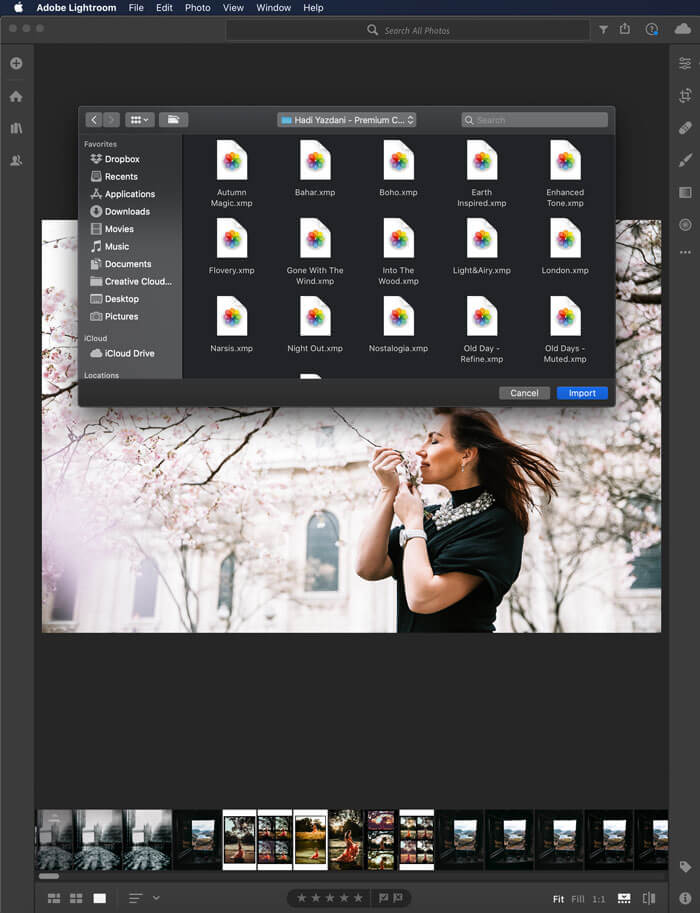
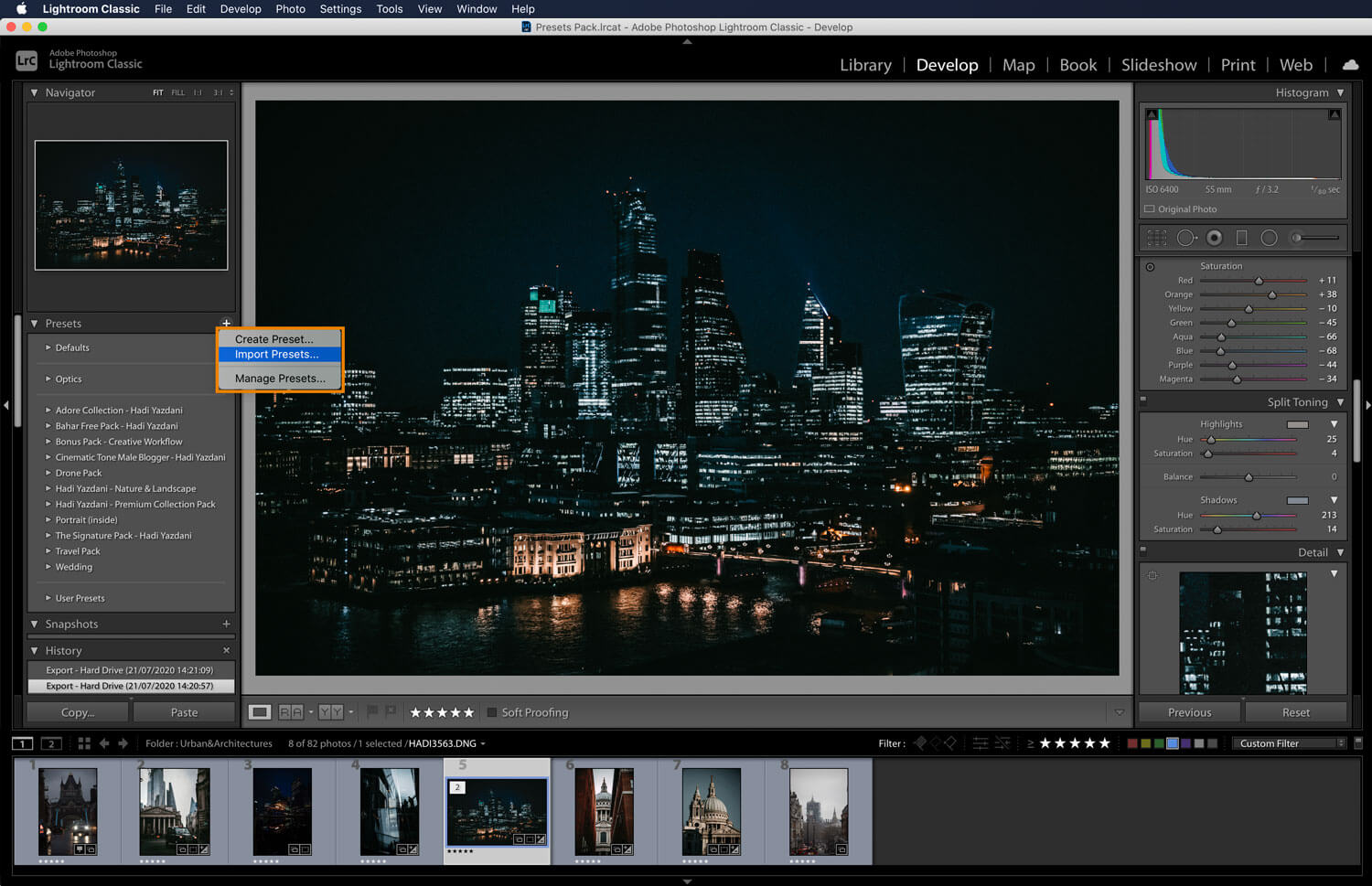
Step 1: In the Lightroom desktop application, click FILE > IMPORT PROFILES & PRESETS.
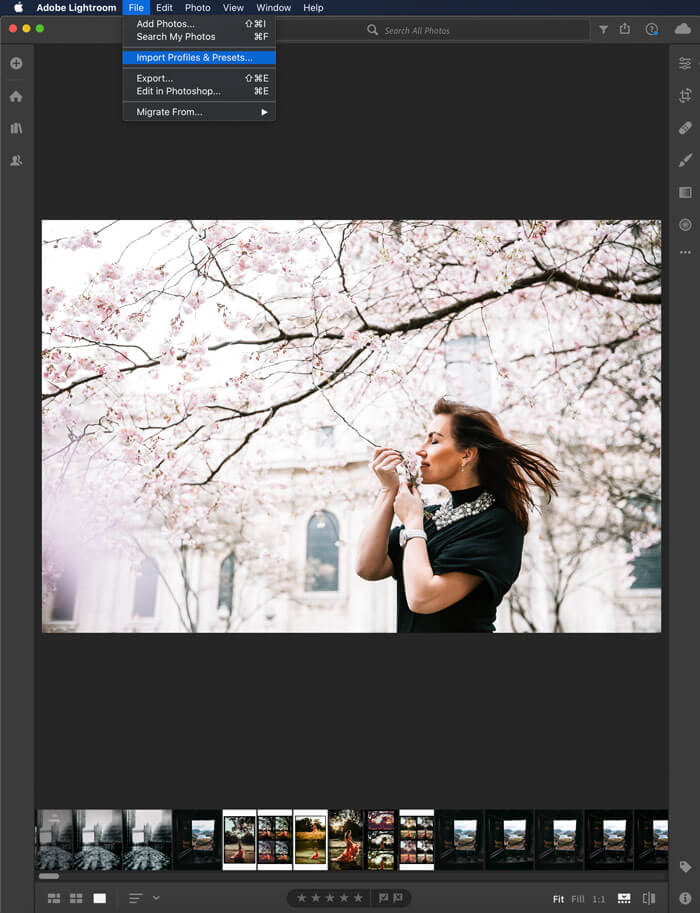
How-to-install-preset-on-Lightroom-mobile03
How-to-install-preset-on-Lightroom-mobile02

Step 2: Navigate to the folder containing the presets you would like to import, select them Allan click IMPORT.

Step 3: Once the presets has been imported, you can see it by clicking the preset button which can be seen in ‘DEVELOP’ tab. Lightroom has created a folder called ‘USER PRESETS‘, which now contains the imported presets.
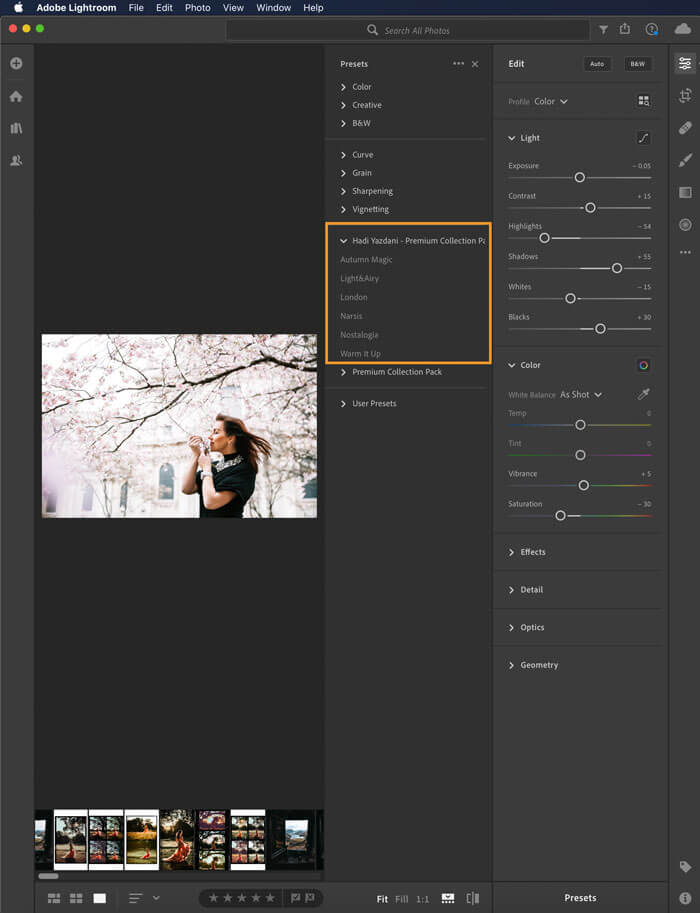
How-to-install-preset-on-Lightroom-mobile01

Step 4: At this point make sure that you are logged in with the same Adobe ID to both Lightroom desktop and mobile app versions, so Lightroom can sync the imported presets to the cloud and across your devices.
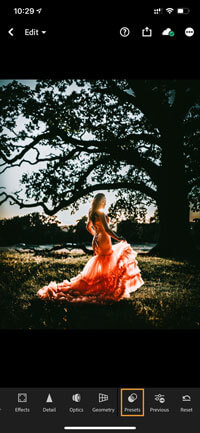
How-to-install-preset-on-Lightroom-mobile04

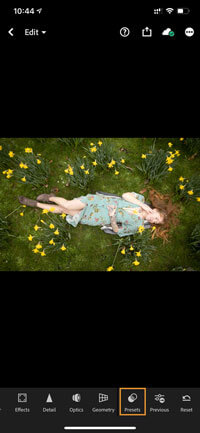
Step 5: Open Lightroom on your mobile device and select a photo to edit. At the bottom tap PRESETS.
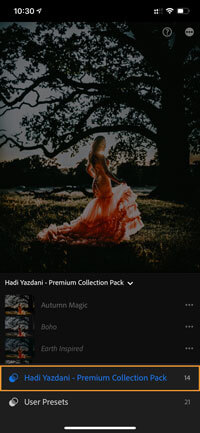
How-to-install-preset-on-Lightroom-mobile05

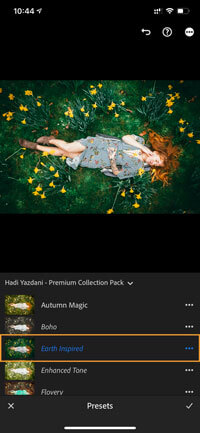
Step 6: Tap the downward facing arrowhead to see more preset categories and select the preset pack name you just imported.
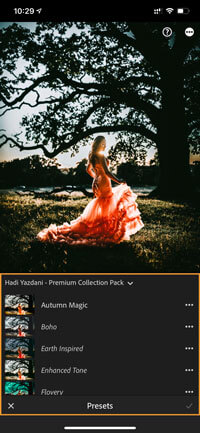
How-to-install-preset-on-Lightroom-mobile06

Step 7: Here you will see all the presets that you imported via Lightroom desktop. All the presets can now be used in your mobile device as well.

Time to start editing

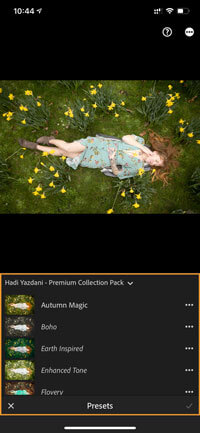
Here’s where fun began! Select an image in the Lightroom Mobile App that you would like to edit. Swipe left on the bottom options until you see “Presets” and tap on that option. It will open with your most recently used preset collection. By tapping on the collection name, you can choose the new collection you just installed.
How-to-install-preset-on-Lightroom-mobile07
How-to-install-preset-on-Lightroom-mobile08
How-to-install-preset-on-Lightroom-mobile09
How-to-install-preset-on-Lightroom-mobile10
How-to-install-preset-on-Lightroom-mobile11

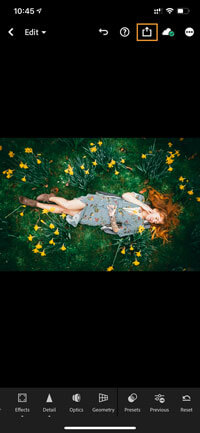
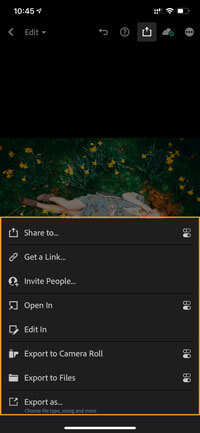
Click through the presets until you find the one you like. When you are finished, click the check mark in the lower right corner. Enjoy! 

+ view the comments

Leave a Reply

Your email address will not be published. Required fields are marked *

H

D

A Storyteller’s Journey

From Conflict to Connection

The original story of becoming a wedding and Elopement photographer!

There was a time when my days were filled with stories of sorrow.
As a photojournalist, I stood witness to grief, to chaos, to the quiet ache of things falling apart. And somewhere along the way, that weight became too heavy to carry.

I realised I wasn’t just documenting pain—I was living in it.
And life… life is far too short for that.

So I made a choice.
To trade headlines for heartbeats.
To tell stories not of loss, but of love.
To capture not endings, but beginnings.

Now, I photograph people at their most alive—
In places that mean something, with people who mean everything.
The joy. The nerves. The stillness. The electricity. The way the light falls when you say,
'this is it, this is us'.

Because moments slip through us faster than we think.
Because time doesn’t pause, even for love.
But a photograph—an intentional, honest photograph—can hold it still.

And that’s what I’m here for.
To make art from your joy.
To help you slow down.
To honour what matters, and preserve it—beautifully, truthfully, forever.

Couple holding hands in Greenwich Park with hilltop view during a pre-wedding photoshoot in London.

 01

Most couples book a pre-wedding photoshoot in London because their photographer suggested it. They imagine a nice set of portraits. Something to hang in the hallway. A trial run before the wedding day. But that is not why I love doing them, and it is not why the couples who have done one with me […]

Bride and groom walking through Asylum Chapel with stained glass and soft light, one of the best places to elope in London.

02

Best Places to Elope in London (2026 Guide) Most couples who come to me already know they want London. What they don’t know is which part of it. That is the question that shapes everything: not just how the photographs look, but how the day feels. London is not one city. It is a hundred […]

Intimate couple portrait at St Dunstan in the East church, bride in red sari, captured by a London wedding photographer.

03

If you’re planning a wedding in London, you’ve already chosen one of the most extraordinary cities on earth to begin your married life. What happens next, specifically who you choose to document it, will shape how you remember that day for the rest of your lives. After years of photographing weddings and elopements across this […]

MORE TO EXPLORE

Couple embracing beneath gothic windows surrounded by ivy at St Dunstan in the East Garden, romantic London couple photography.

London Engagement Photographer

The Experience

Man proposing at Pergola and Hill Garden in Hampstead, emotional London proposal photography moment.

Surprise Proposal Photographer

Learn More ...